
Facebook Lead Generation Integration - Troubleshooting Guide
This troubleshooting guide is designed to assist users in resolving issues with integrating Facebook lead ads with your system. It covers common problems such as missing leads, incorrect form mappings, and troubleshooting registration page leads. Follow the solutions below to ensure seamless integration and accurate lead tracking.
FAQ
Question: Why do I see only old forms in my system, even though Facebook shows more recent leads?
Answer: The issue may arise from incorrect or outdated form mappings between Facebook and your account. To resolve this, follow these steps:
- Navigate to Settings > Integrations > Facebook.
- Disconnect your Facebook page from the system.
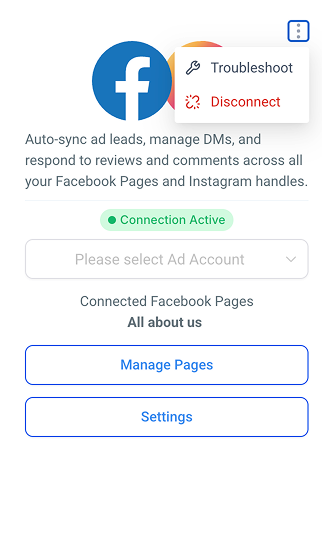
- Reconnect the page to ensure that the system syncs the most current forms.
- After reconnecting, check if the latest forms are visible in the system under Sites > Forms>Select your desired form.

Question: I’ve verified my forms, but leads from my registration page are still not being counted. What should I do?
Answer: If leads from your registration page aren’t being counted, ensure that the forms are correctly mapped to the leads in the system:
- Go to Integrations> Facebook form field mapping.
- Verify that the form used on the registration page is properly connected to the corresponding Facebook Lead Ad form.
- If the forms are mismatched, remap the correct form by selecting Edit fields next to the form and choosing the correct Facebook form.

- After saving the changes, check if the leads are now recorded properly.
Question: What should I do if my Facebook forms have been verified, but leads are still not being captured?
Answer: If the forms are verified but leads aren’t being captured, the issue could be with the settings in the Facebook integration:
- Navigate to Settings > Integrations > Facebook.
- Ensure that all permissions and lead access are granted correctly to allow the system to fetch the leads.
- If the permissions are in place and leads still aren’t captured, try refreshing your connection by disconnecting and reconnecting the Facebook integration.
- Check if new leads are now being captured.
Question: How can I resolve discrepancies between the leads on Facebook and my system?
Answer: To fix discrepancies, follow these steps:
- Go to Settings > Integrations > Facebook and ensure the Facebook account has the correct permissions.
- If permissions are correct, disconnect and reconnect the Facebook integration to refresh the sync.
- Check your system’s lead count to see if it matches Facebook.
Question: What should I do if my Facebook account has been compromised or I’ve changed my password, and now leads are not syncing correctly?
Answer: If your Facebook account gets compromised, locked out, or if you change your password, this can cause issues with the integration. To resolve this:
- Navigate to Settings > Integrations > Facebook.
- Disconnect and reconnect your Facebook page to ensure that the system syncs properly.
-
After reconnecting, check if your leads are being captured correctly.
Keep in mind that this step is necessary whenever there are significant changes to your Facebook account.
Question: How do I fix specific data fields that aren't transferring correctly from Facebook?
Answer: You should manage this through the Facebook form field mapping section. By selecting Edit fields next to your specific form, you can manually pair Facebook’s data fields with the corresponding fields in your system to ensure data accuracy.