
Managing WhatsApp Conversations: A Guide to Categories, Duration, and Free Entry Point Conversations
Starting July 1, 2025, WhatsApp will implement a per-message pricing model for businesses. Instead of charging a flat fee for 24-hour conversation windows, businesses will now pay for each message sent. This approach provides greater transparency, control, and flexibility, making it easier for businesses to manage communication costs and plan their messaging strategies efficiently.
Key Messaging Categories
WhatsApp divides messages into four main categories, each with distinct pricing and usage guidelines:
1. Marketing Messages
- Description: Promotional messages, including product offers, announcements, and re-engagement campaigns.
- Cost: Charged per message, regardless of the customer service window.
- Use Case Examples: Sales promotions, event invitations, abandoned cart reminders.
2. Utility Messages
- Description: Transactional messages related to specific customer actions or updates.
- Cost: Charged per message outside the customer service window; free within an active 24-hour customer service window initiated by the customer.
- Use Case Examples: Order confirmations, shipping updates, appointment reminders.
How It Works:
We charge for each template message a business sends to a user. For example, if a business sends 1 marketing message and 1 utility message, that incurs 1 charge for each category.
What does this mean?
Pricing on the WhatsApp Business Platform is consistent with alternate channels, which also charge for each message.
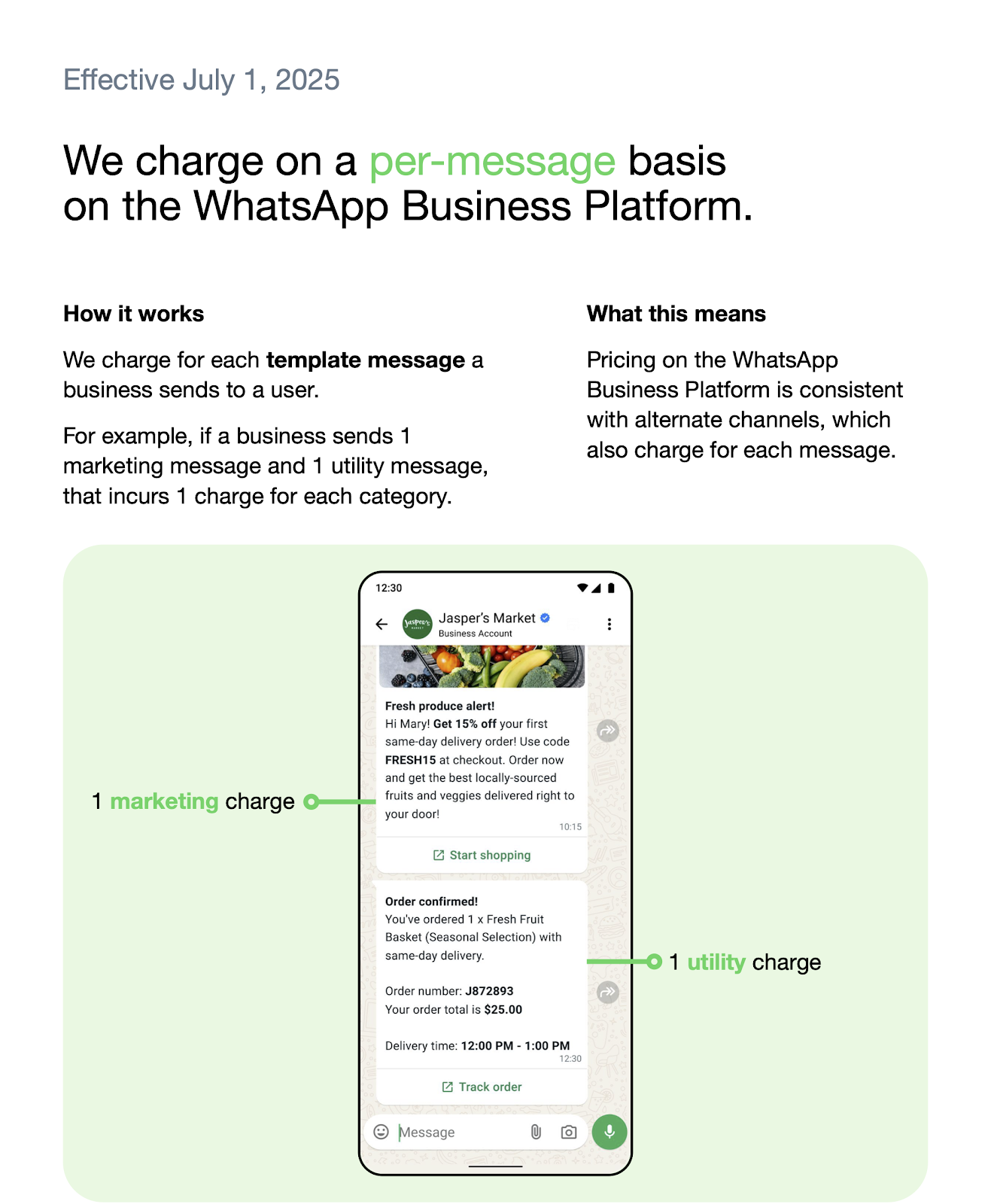
IMPORTANT: Each category has specific initiation methods.
- Marketing, utility, and authentication conversations can ONLY be opened with template messages.
- Service conversations can ONLY be opened with free-form messages.
3. Authentication Messages
- Description: Messages used to authenticate users, such as one-time passcodes for account verification or recovery.
- Cost: Charged per message when sent outside the 24-hour service window; free within the window.
- Use Case Examples: Two-factor authentication codes, account recovery codes.
4. Service Conversations [Effective 1 November 2024]
This 24-hour timer begins when a customer messages you. During this window, free-form messages can be sent without opening additional conversations.
- Used to resolve customer inquiries and issues.
- Service conversations are initiated when a free-form message is delivered to a customer, provided no other conversation of any type is open.
- These conversations rely on an active customer service window between you and the customer.
How It Works:
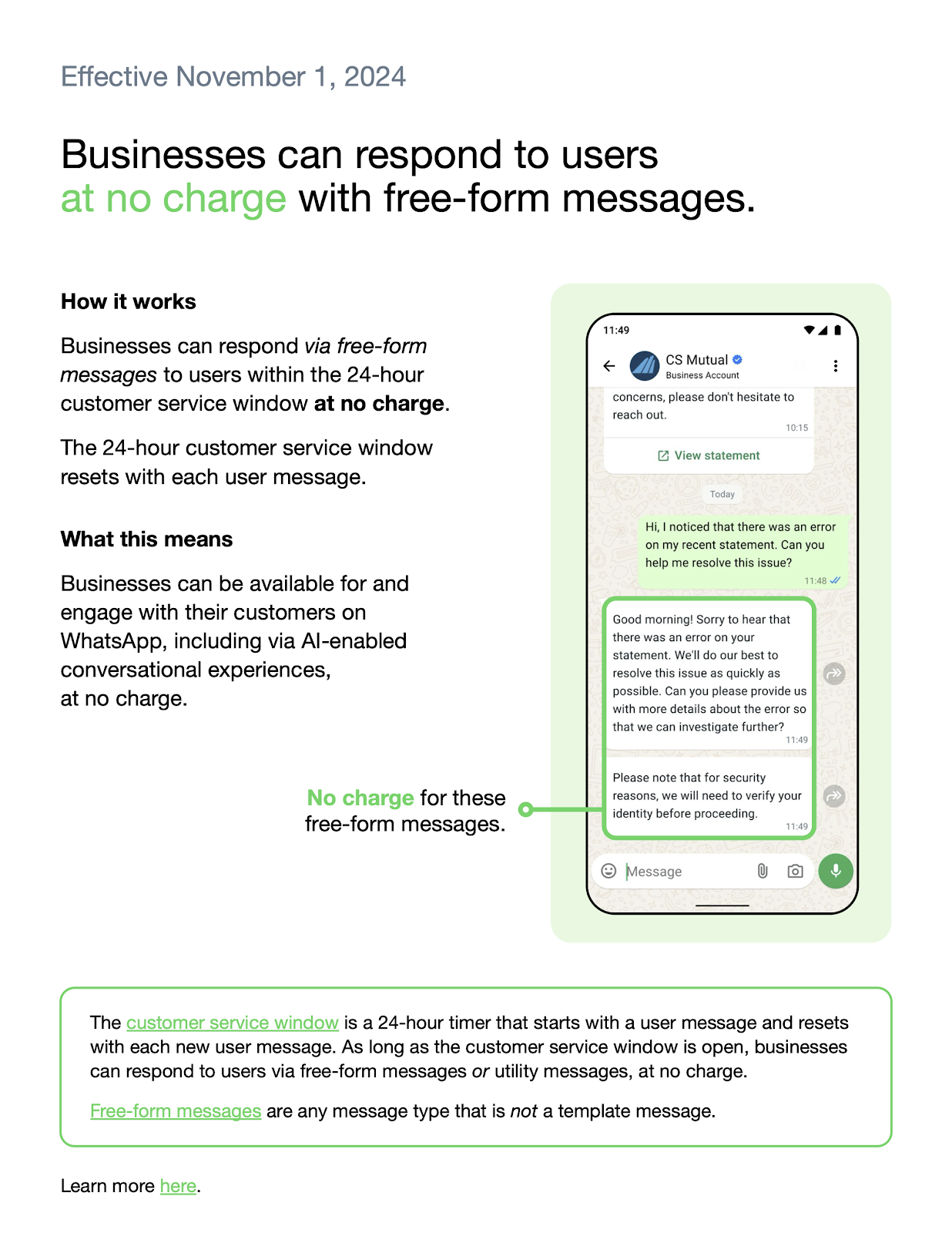
Businesses can respond via free-form messages to users within the 24-hour customer service window at no charge. The 24-hour customer service window resets with each message.
What does this Mean?
Businesses can be available for and engage with their customers on WhatsApp, including via AI-enabled conversational experiences, at no charge.
The customer service window is a 24-hour timer that starts with a user message and resets with each message. As long as the customer service window is open, businesses can respond to users via free-form messages or utility messages at no charge.
Note: Free-form messages are any message type that is not a template.
Example 1: Per Message-Based Pricing
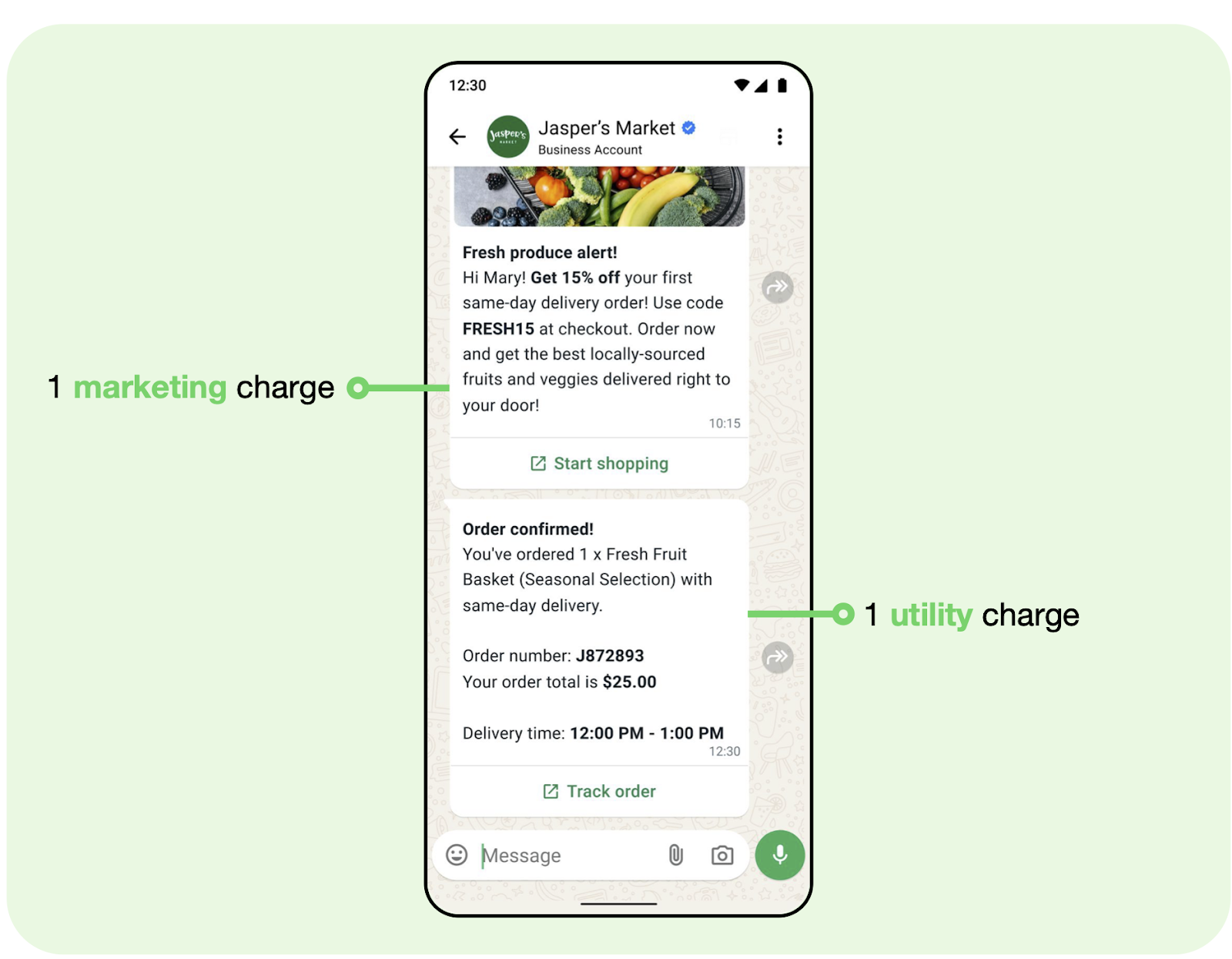
We charge for each template message a business sends to a user. For example, if a business sends 1 marketing message and 1 utility message, that incurs 1 charge for each category.
Example 2: Free-Form and Utility Messages
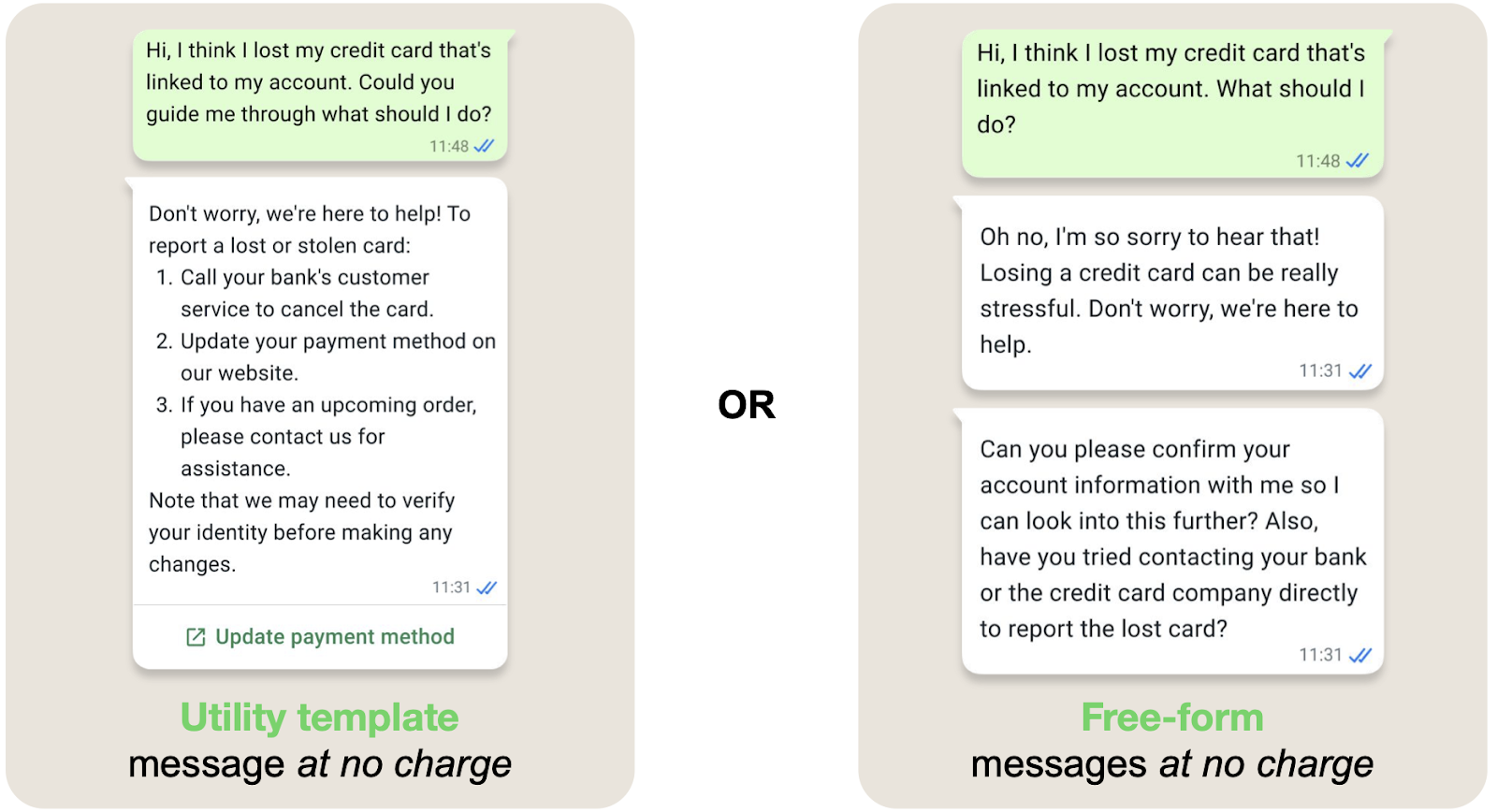
Businesses can respond to users at no charge with free-form and utility message templates. When the customer service window is open, businesses can also send utility messages at no charge.
Example 1:Per message based pricing We charge for each template message a business sends to a user. For example, if a business sends 1 marketing message and 1 utility message, that incurs 1 charge for each category. (Click the phone image to zoom into the conversation) |
|
Example 2:Businesses can respond to users at no charge with free-form messages and utility template messages. When the customer service window is open, businesses can also send utility messages, at no charge. (Click the phone image to zoom into the conversation) |
|
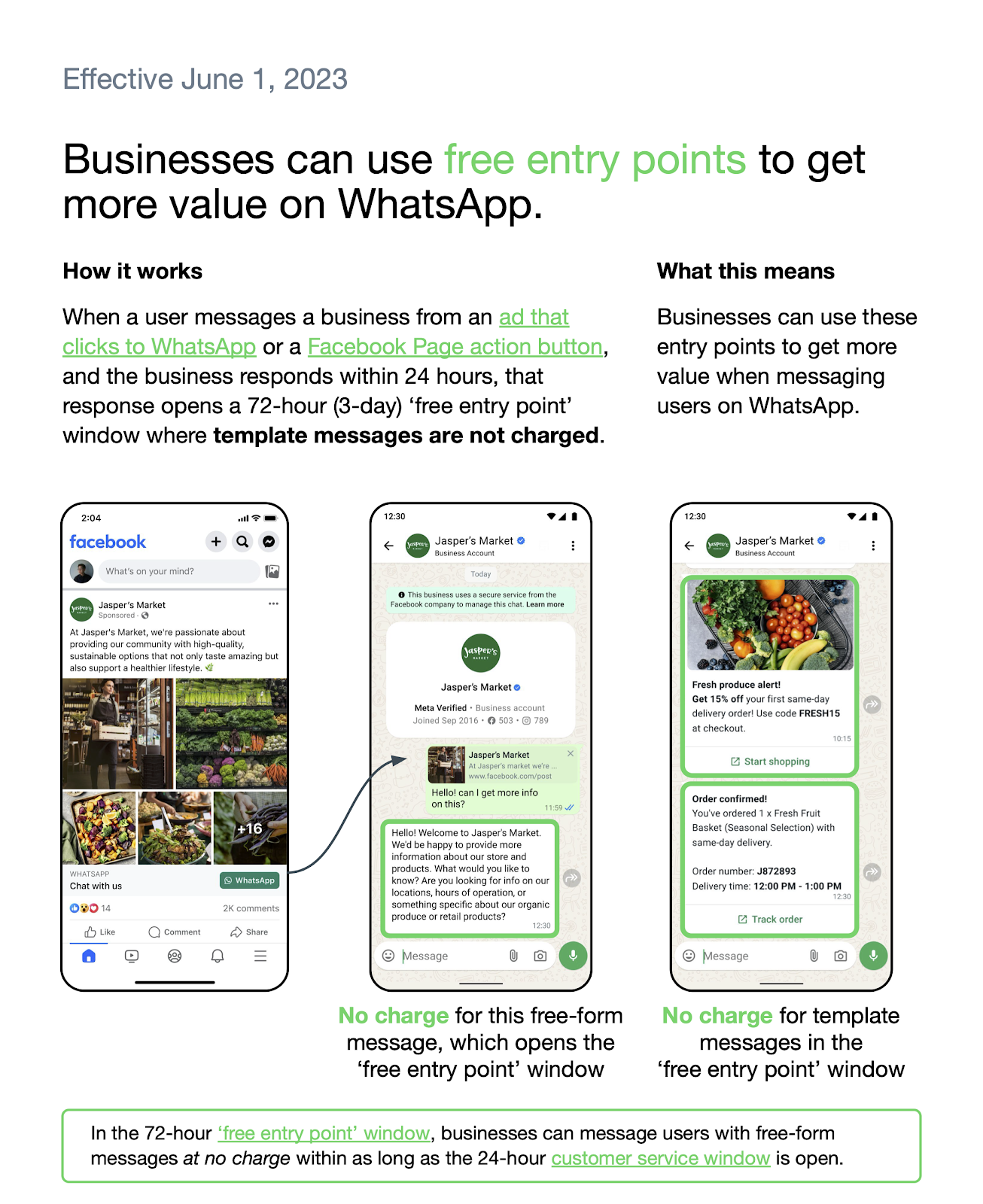
Free Entry Point Conversations [Effective 1 June 2023]
Free entry point conversations provide cost-saving opportunities for businesses by allowing free communication for a limited duration.
- How It’s Triggered: A customer messages you via a Click to WhatsApp Ad or Facebook Page Call-to-Action button, and you respond to the message within 24 hours.
- Duration: These conversations last 72 hours and automatically close all other open conversations.
- Cost Efficiency: Once initiated, no additional charges are incurred for any type of message sent within the 72-hour window.
How It Works:
When a user messages a business from an ad that clicks to WhatsApp or a Facebook Page Action button, and the business responds within 24 hours, that response opens a 72-hour 'free entry point' window where template messages are not charged.
What does this mean?
Businesses can use these entry points to get more value when messaging users on WhatsApp.
FAQ's
Question: What are the message categories?
Answer: Marketing, Utility, Authentication, and Service messages, each with specific pricing and usage scenarios.
Question: How are conversations opened?
Answer: Conversations are opened by sending template messages or free-form messages, depending on the category.
Question: Can multiple conversations be open with the same customer?
Answer: Yes, multiple conversations can be open with different categories of messages.
Question: What is the customer service window?
Answer: A 24-hour window that starts when a customer messages you, allowing businesses to send free-form responses.
Question: What is a free entry point conversation?
Answer: A free-entry point conversation is initiated when a customer contacts you via an ad or Facebook CTA, and you respond within 24 hours. This opens a 72-hour window where no charges are incurred.
Question: What happens if I respond after 24 hours with a free-form message?
Answer: The message will fail, as only template messages can be used to reinitiate messaging after the window closes.
Question: What happens if a customer sends me a message while a "Marketing" conversation is already open?
Answer: The marketing conversation stays open, but the customer's message also opens a Service Window. This means you can now reply to their questions for free using free-form messages, while still having your marketing session active.
Question: What happens if a standard conversation is already open when a 72-hour free window is triggered?
Answer: The 72-hour free entry point window will automatically take precedence and close all other open, paid conversations with that customer to ensure the business is not charged during that period.
Question: How does the "Customer Service Window" benefit businesses regarding Utility and Service messages?
Answer: Within an active 24-hour customer service window, businesses can send Utility template messages and free-form Service messages at no charge. The 24-hour timer resets every time the customer sends a message.