
Talk to Dean! Meet Dean AI – Your On Demand Success Coach
Imagine having Dean Graziosi available 24/7 to answer your questions, give feedback, and guide you through building your business. That’s exactly what you get within the Talk to Dean tab inside your Mastermind.com account dashboard!
Trained on decades of proven strategies from Dean, Dean AI is more than just another tool—it’s one of the most advanced AI business coaches for knowledge entrepreneurs.
Whether you’re refining your messaging, practicing sales, brainstorming ideas, or planning your next step, Dean AI is like having a mentor in your pocket.
Frequently Asked Questions (FAQs)
-
What is Dean AI?
Dean AI is your virtual mentor built into the Mastermind.com navigation menu. Think of it as your personal coach — ready to provide clarity, action steps, and support whenever you need it most.
-
Where can I access Dean AI?
You can access Dean AI directly from your Mastermind.com main dashboard:
- Log in to your Mastermind.com account.
- Click the Talk to Dean tab on the left navigation menu.


-
How can I interact with Dean AI?
You can interact with Dean AI in two ways:
- Chat/Text: Type your questions in the "Ask Dean Graziosi a question" chat box.
- Call/Voice: Click Call on the main screen, then Start a call to have a direct, live conversation with Dean AI.

-
What kinds of things can I ask Dean AI?
Dean AI can help with everything from big-picture strategy to specific tactical support. Here are some example prompts:
- “Dean, can you walk me through the 7 Levels Deep exercise to uncover my deeper ‘why’?”
- “Can you write me a motivational letter from my future self 6 months from now?”
- “Help me identify my unique superpower based on my life experiences and skills.”
- “Can we refine my niche and solution statement together? Here’s what I’ve got so far.”
- “Let’s brainstorm 5 places I could connect with a warm audience in my existing network.”
Simply type your question in the chat!
-
Is Dean AI a real person?
No — Dean AI is powered by artificial intelligence. It’s been trained on Dean’s knowledge, coaching style, and proven frameworks to feel like you’re speaking directly with him.
-
What’s the difference between Dean AI and GG?
- GG is your all-purpose assistant on Mastermind.com. It draws on the thinking of both Dean Graziosi and Tony Robbins to help with a wide range of needs — from brainstorming and quick answers to content creation.
- Dean AI is a digital version of Dean Graziosi. It’s designed to reflect his personality, knowledge, and coaching style, giving you personalized business guidance and strategies built on his 30+ years of experience.
- Think of it this way: GG is broad and versatile, while Dean AI is focused and specialized in business coaching.
-
Will Dean AI replace support teams or coaches?
Not at all. Dean AI is here to enhance your Mastermind experience, not replace human connection. You’ll still have access to our dedicated Customer Support team for personalized help.
-
How do I access my Dean AI chat history?
You can access your Dean AI Chat history by selecting Chat on the main screen, then Chat History in the upper left corner of the screen:

-
How do I start a New Chat conversation with Dean AI?
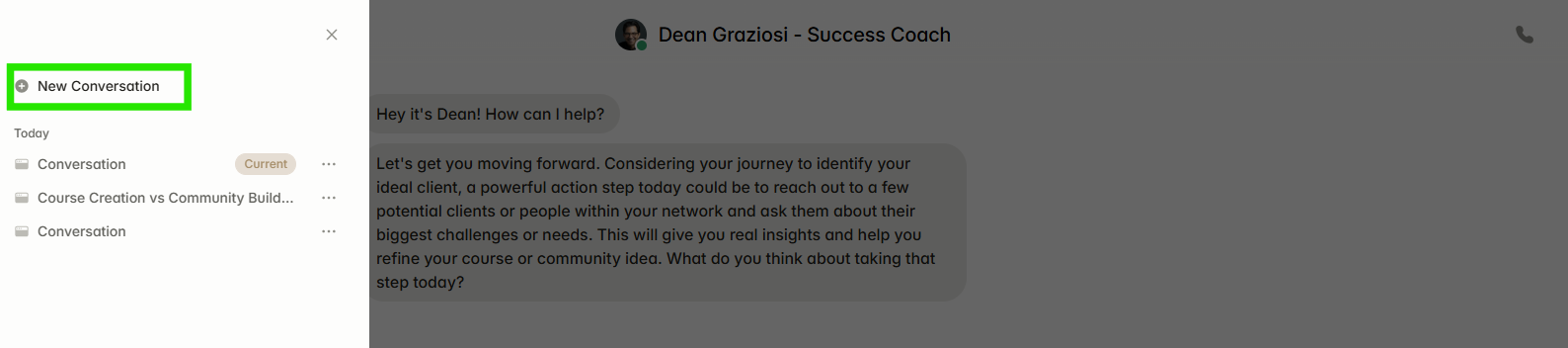
If you reload the page or reopen Dean AI, your conversation will resume exactly where you left off, allowing you to continue seamlessly. Within the chat history, you can also view and switch between your previous conversations at any time. When within Chat history, select New Conversation to start a new chat.
-
How do I Rename, Share or Archive a Chat conversation with Dean AI?
When within Chat history, select the three dots next to the chat you're working with. A drop down menu will appear with options to Rename, Share or Archive the chat.

-
Is there a Dean AI app?
There is no standalone app for Dean AI at this time. You can access it exclusively through your Mastermind main dashboard on Mastermind.com. Future updates may expand access — stay tuned!
-
Can I use Dean AI in multiple languages?
Yes! Dean AI supports both text and voice conversations in a wide range of languages.
- Chat/Text: Simply type in your preferred language — Dean AI will reply in the same language.
-
Call/Voice: Choose your language from the drop-down menu before starting a call.
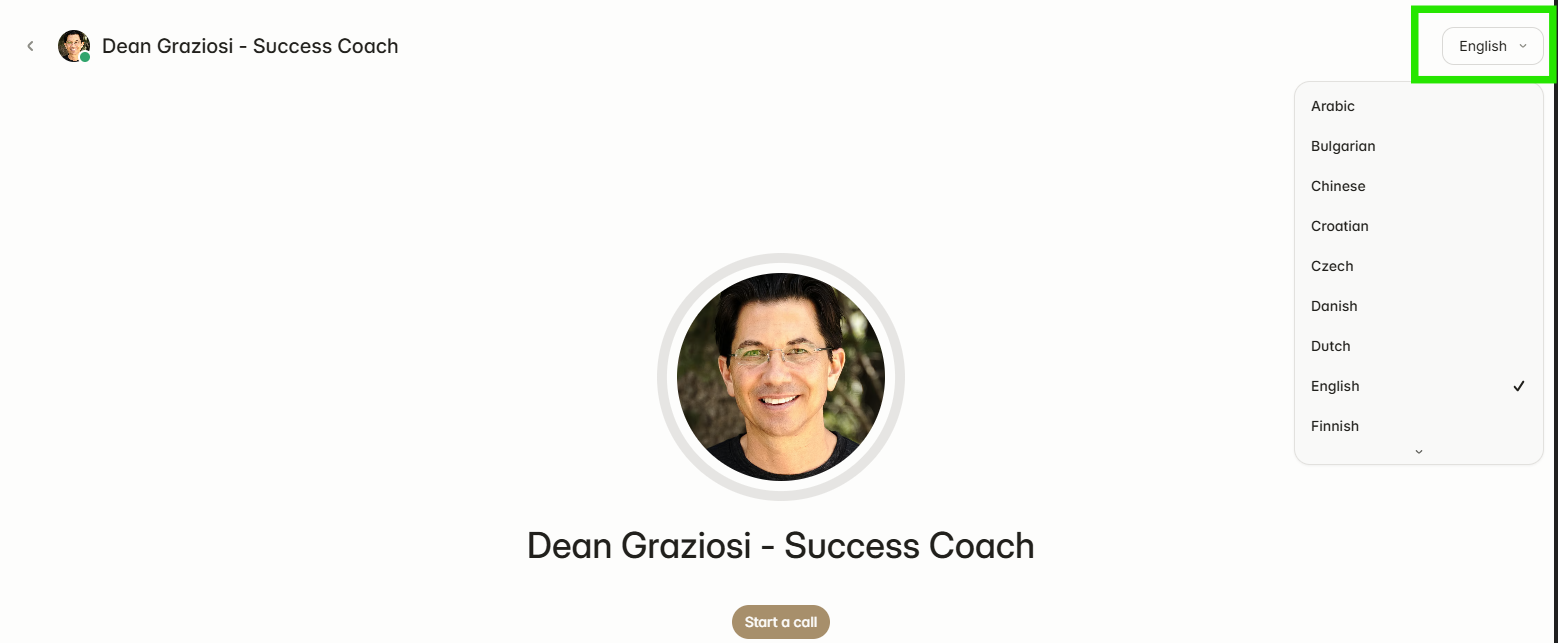
Currently supported languages include: English, Spanish, French, Hindi, German, Portuguese, Japanese, Korean, Arabic, Russian, and many more (full list available in your Talk to Dean tab).
-
Can I upload files and images to Dean AI?
Yes! You can upload files and images to give Dean more context.
- Just attach your file and include a message in the chat box (uploads alone won’t send).
- Supported formats: documents, screenshots, and images.
- Note: Video and audio file uploads are not supported at this time.
With Dean AI, you’ll always have a mentor ready to help you stay motivated, refine your strategy, and take action in your business journey.
If you run into any questions or concerns, please reach out to our support team at support@mastermind.com and we will be happy to assist!