
Ad Manager - Audience Segments for Google Ads
The Audience Segments feature in the Mastermind Ad Manager enables users to create, manage, and target audiences for Google Ads directly within one unified interface. Designed to simplify campaign management, this feature allows for end-to-end audience control from creation to activation ensuring higher relevance, personalization, and improved campaign performance.
Key Features and Benefits
1. Centralized Audience Management
Access a dedicated “Audience Segments” tab within Ad Manager settings for Google Ads. This serves as a single location to view, create, and organize all audience segment types efficiently.
2. Multiple Audience Segment Types Supported
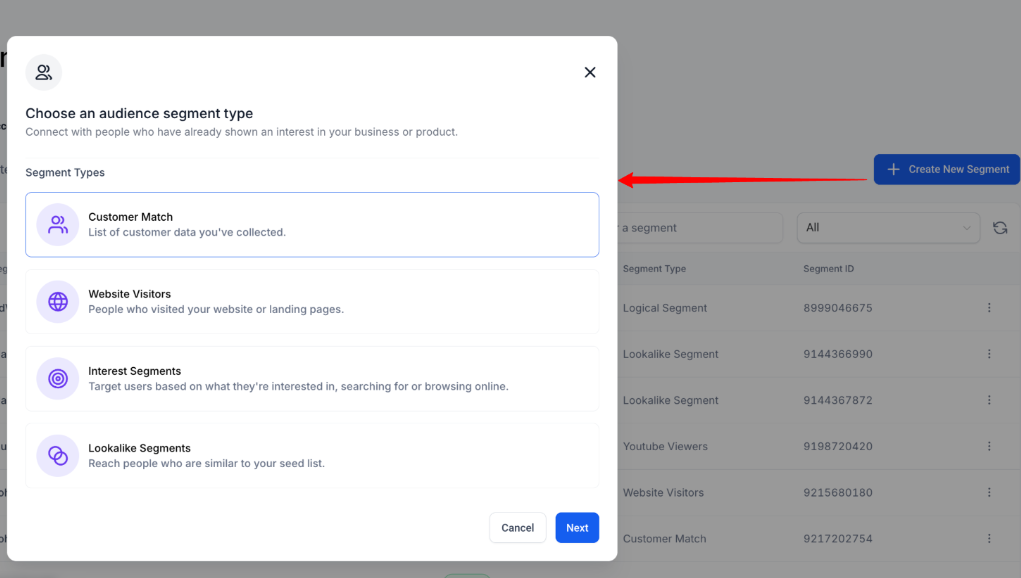
- Customer Match: Upload or sync customer data lists to target known users.
- Website Visitors: Retarget visitors who interacted with your website or landing pages.
- Interest Segments: Reach users based on browsing interests or search intent.
- Lookalike Segments: Expand your reach to audiences similar to your best-performing customers.
3. Inline Audience Creation During Campaign Setup
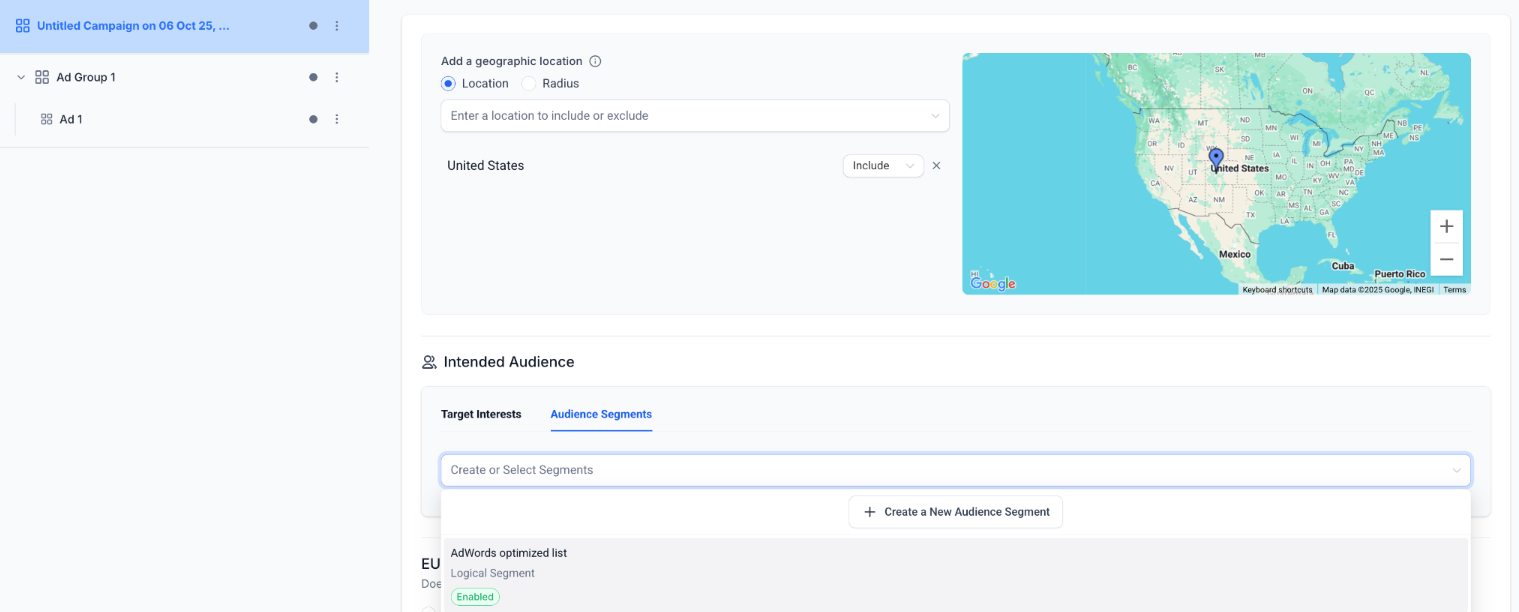
While building a campaign, users can directly select from existing audience segments or create a new one without navigating away from the builder. This ensures a smooth and efficient setup experience.
4. Targeting Experience
The Intended Audience interface includes dual tabs Target Interests and Audience Segments allowing users to combine affinity and in-market targeting with precise audience segmentation for optimal results.
How to Use
Access the Feature
Go to Ad Manager Settings → Platform: Google Ads → Audience Segments.
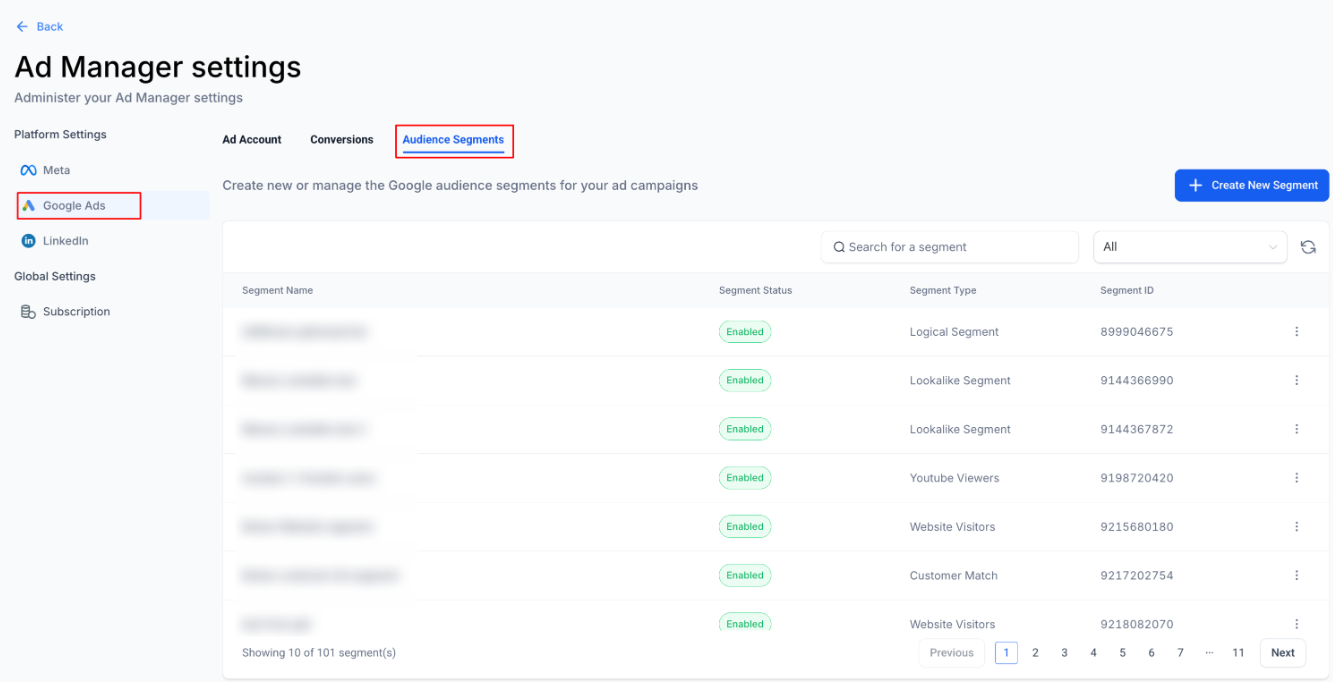
2. Create a New Audience Segment
Click Create New Segment and choose from:
Customer Match
Website Visitors
Interest
Lookalike
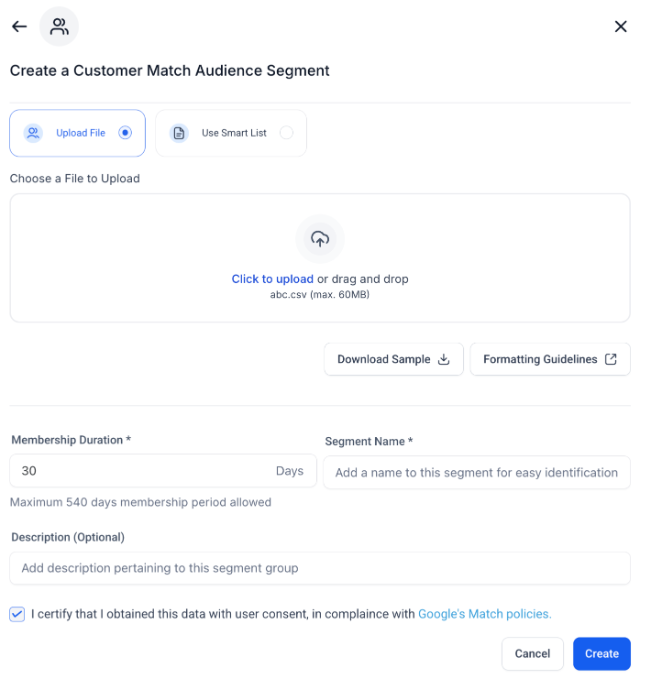
3. Configure Segment Details
Add all relevant details such as file uploads, membership duration, or audience rules, and save your segment.
4. Use Within Campaign Builder
During campaign setup, navigate to Intended Audience → Audience Segments.
Choose from existing segments or
Click Create New Audience Segment to add one instantly.
5. Activate Campaign
Finalize your campaign setup and publish it to start leveraging advanced audience targeting.
FAQs
Question: What are Audience Segments in Ad Manager?
Answer: Audience Segments allow you to organize and target specific groups of users in your advertising campaigns based on behavior, interests, or interactions.
Question: Can I create multiple types of audience segments?
Answer: Yes, you can create different segment types such as Customer Match, Website Visitors, Interest, and Lookalike to serve diverse marketing objectives.
Question: Do I need technical expertise to use this feature?
Answer: No. The process is designed to be intuitive, with clear options and guided steps for creating and managing audiences.
Question: Can I edit or update existing audience segments?
Answer: Yes, existing segments can be modified at any time to update audience details, targeting rules, or membership duration.
Question: Are there any limitations to note?
Answer: Audience Segments depend on available user data and consent. Ensure that your data collection methods comply with privacy regulations and that audience lists meet platform-specific minimum requirements for activation.
Question: Can I use audience segments in my campaigns immediately after creating them?
Answer: Yes, once you've created an audience segment, you can use it immediately within the campaign builder, ensuring a smooth workflow from segment creation to campaign activation.
Question: What is the benefit of the "Inline Audience Creation" feature?
Answer: It allows you to create new audience segments directly within the campaign builder. This means you don't have to leave your current workflow or navigate to a different tab to add a new audience while setting up a campaign.
Question: What is the "Customer Match" segment type used for?
Answer: Customer Match allows you to upload or sync your own customer data lists (like email addresses) to target known users who have already interacted with your business.
Question: How can I reach new people who are similar to my current customers?
Answer: You can create Lookalike Segments. This feature allows you to expand your reach by identifying and targeting audiences who share similar behaviors and characteristics with your best-performing customers.