
Toll-Free Verification + Political Campaign
The purpose of this article is to provide a comprehensive guide to the Toll-Free Verification (TFV) process. As mobile carriers implement stricter standards to ensure messaging transparency and security, businesses must provide detailed documentation to maintain high deliverability. This guide outlines the essential information required for general business verification and the specialized requirements mandatory for political election campaigns.
Key Features and Benefits
- Standardized Compliance: Aligning with current carrier requirements reduces the risk of message filtering or number blocking.
- Enhanced Transparency: The detailed multi-step flow ensures that all necessary business details are captured upfront, leading to faster approval times.
- Political Vetting Integration: Specialized fields for political campaigns allow for higher messaging throughput and legitimate campaign outreach.
- Structured Opt-In Verification: Requiring proof of how users subscribe to your messages protects your brand's reputation and ensures adherence to consumer protection laws.
Step-by-Step Verification Instructions
Step 1: Business and Contact Information
In this initial stage, you must provide the legal foundation of your organization.
- Enter your Legal Entity Name and any DBA (Doing Business As) name.
- Select your Legal Entity Type (e.g., Non-Profit, Government, Private/Public Profit).
- For all types except Sole Proprietors, you must provide the Business Registration Number, the Registration Authority, and the Country where the business is registered.
- Provide a valid Website URL and the contact details (Name, Email, and Phone Number) for the person managing the account.
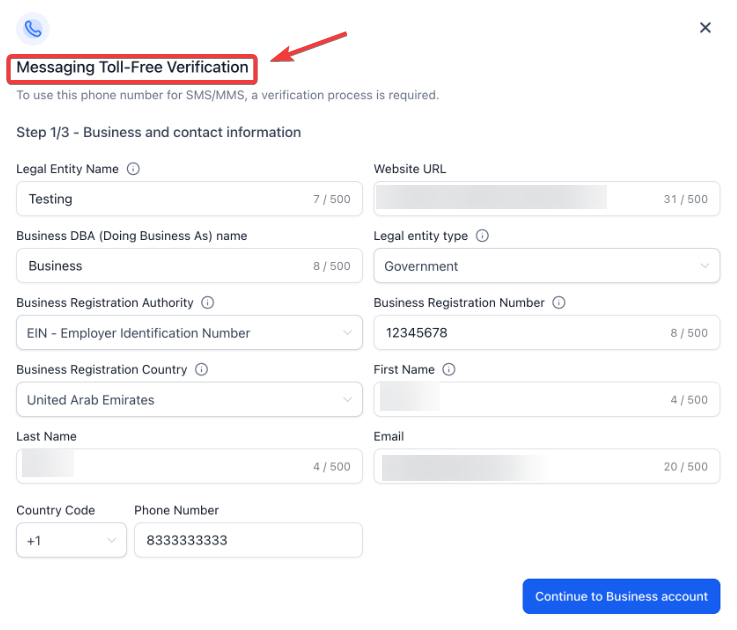
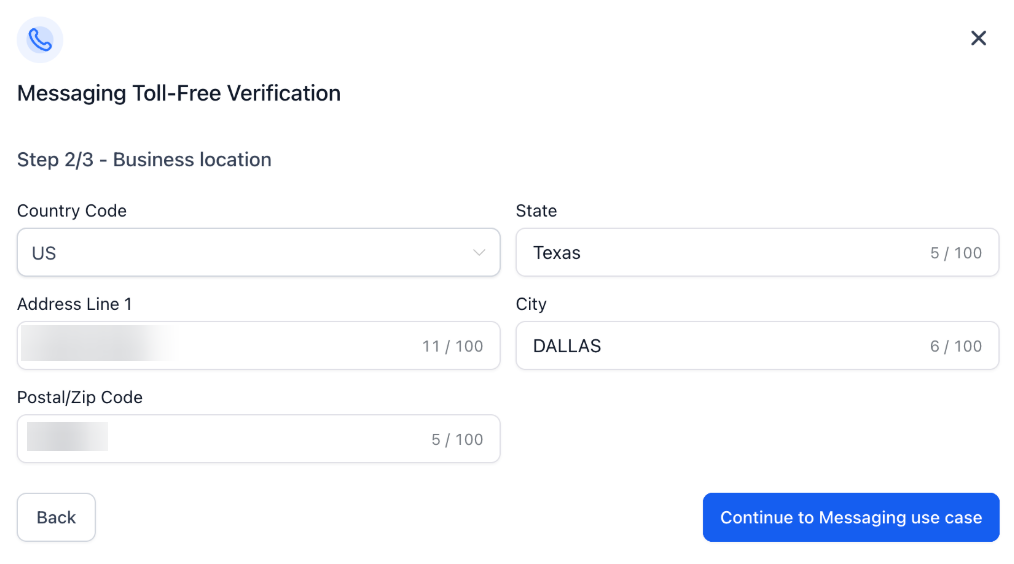
Step 2: Business Location
Carriers require a physical headquarters or office address to verify the legitimacy of the entity.
- Enter the full physical address, including City, State, and Postal Code.
- Ensure the address matches the registration documents of the business.
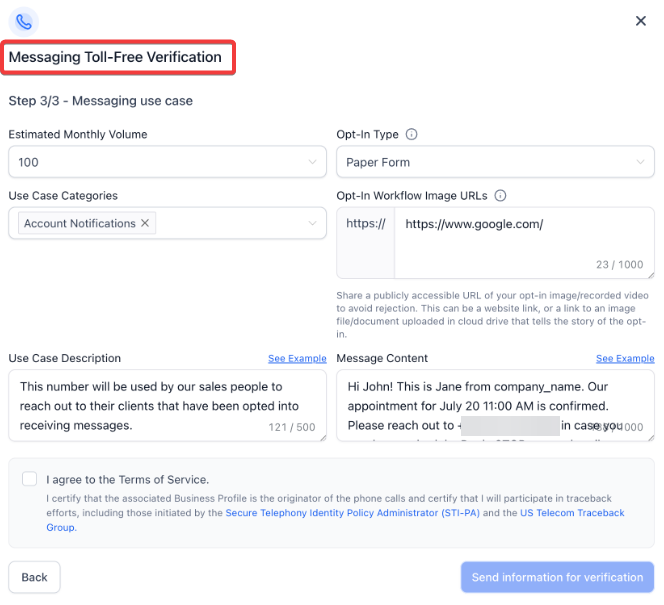
Step 3: Messaging Use Case and Political Requirements
This step defines what you are sending and why.
- Select the Use Case Category that best describes your messaging.
- Provide a Detailed Use Case Description and Sample Message Content.
- Opt-In Proof: You must provide publicly accessible Image URLs showing how a customer consents to receive messages (e.g., a screenshot of a website checkbox or a physical sign-up form).
- Political Campaigns: If your use case is for a Political Election Campaign, you must provide a Campaign Verify (CV) Auth Token.
- The token must follow the specific format: cv|<version>|mno|tfree|<id>|<secret>.
- Verification must be completed through the vetting provider before submission to receive this token.
Pro Tips for Successful Verification
- Consistency is Key: Ensure that the Business Name and Address entered in the form match exactly what is listed on your tax documents or business registration.
- Publicly Accessible Links: When providing Opt-In Workflow Image URLs, ensure the links are not behind a login or password. Carriers must be able to view these images immediately to approve the application.
- Volume Accuracy: Be as accurate as possible with your Estimated Monthly Volume. Significant discrepancies between estimated and actual volume can trigger manual reviews.
- Political Timelines: If you are running a political campaign, start the vetting process early. Obtaining a vetting token is a prerequisite and can take several days to finalize before you can even begin the toll-free submission.
Special Requirements and Limitations
- Geographic Focus: The specific political vetting requirements outlined here primarily apply to campaigns within the United States (Federal, State, and Local levels).
- Format Strictness: Auth Tokens must be entered exactly as provided by the vetting service; any alteration to the format cv|...|... will result in an immediate system error.
- Terms of Service: All users must certify that they agree to the carrier Terms of Service. Violations of these terms, such as sending prohibited content, can lead to permanent revocation of messaging privileges regardless of verification status.
FAQs
Question: Why is a Campaign Verify (CV) Auth Token required for political messaging?
Answer: Carriers have introduced this requirement to prevent spam and ensure that political organizations are properly vetted. This token acts as a digital seal of approval, confirming the organization’s identity and eligibility to conduct election-related outreach.
Question: Do these requirements apply to toll-free numbers that were already approved?
Answer: Yes. Carriers require that both new and existing toll-free numbers used for political election campaigns meet these compliance standards. Existing numbers may face restrictions or rejections if the vetting token is not added to the profile.
Question: What happens if I do not have a business website?
Answer: A website URL is a required field for toll-free verification. It serves as a primary method for carriers to verify the existence and nature of your business. If you do not have a traditional website, a professional social media business page or a detailed landing page may sometimes be accepted, provided it clearly displays your brand and opt-in information.
Question: What does "Not Validated" or "Rejected" mean in the verification flow?
Answer: A rejection usually means there is a mismatch in data or insufficient proof of opt-in. Common reasons include "Address Mismatch," "Inaccessible Opt-In Images," or "Vague Use Case Descriptions." You will typically receive a reason code which allows you to correct the specific field and resubmit.
Question: Is the toll-free verification different from a standard local number registration?
Answer: Yes. Toll-free numbers undergo a separate verification process (TFV) compared to the 10-digit long code (10DLC) registration used for local numbers. Toll-free numbers are often preferred for their faster setup times and higher throughput once verified.
Question: What are the specific formatting requirements for a Campaign Verify (CV) Auth Token?
Answer: The Auth Token must be entered exactly as provided by the vetting service without any alterations. It must follow the specific structural format: cv|<version>|mno|tfree|<id>|<secret>. Any deviation from this format or any manual alteration will result in an immediate system error.