
Company-Based Workflows
In business automation, most workflows have traditionally focused on individual leads, prospects, or clients. But what about entire organizations? With Company-Based Workflows, you can automate actions, updates, and communication at the company level, giving you a true B2B automation solution.
Whether you're managing corporate clients, multi-contact organizations, or complex sales cycles, this feature allows you to streamline onboarding, updates, and lifecycle management all while keeping company records and associated contacts perfectly aligned.
Key Features & Benefits
Company-Based Workflow Builder
- Trigger workflows directly from Company record creation or updates.
- Act on Companies as the primary record, independent of contacts.
- Easily manage onboarding, lifecycle tracking, ownership changes, or Mastermind hygiene for business accounts.
Cross-Object Automation
- Seamlessly connect Company, Contact, and Custom Object records.
- Synchronize data between related objects with zero manual intervention.
Powerful New Workflow Actions
- Create, Update, or Clear fields for both Companies and their associated Contacts.
- Extend Contact workflows to interact with associated Company records (e.g., update a company's status when a contact's status changes).
Advanced Workflow Triggers
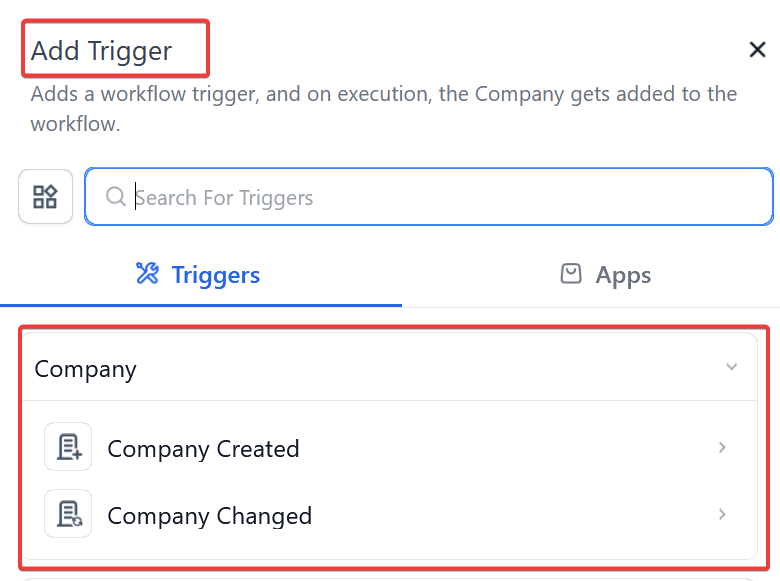
- Automate based on Company Created or Company Changed triggers.
Scalable Operations
- Easily scale B2B operations, from onboarding to contract renewals.
- Centralize data management across your Mastermind’s hierarchy.
How to Use Company-Based Workflows
Step 1: Create a Company-Based Workflow
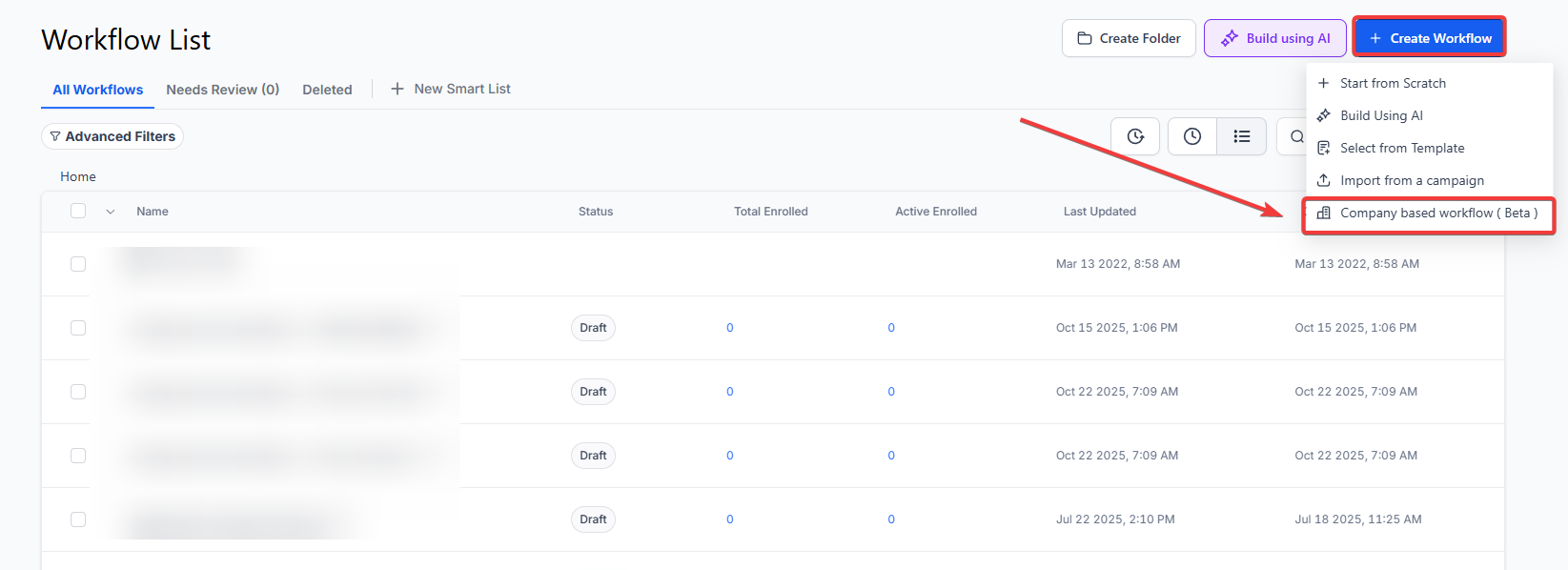
- Go to Tools & Reporting > Automations > Workflows > Create Workflow.
- Select Company-based workflow as your starting point.
Step 2: Choose Your Trigger
- Select Company Created to start a workflow when a new company is added.
- Or use Company Changed to react when a specific field (like Industry or Status) is updated.
Step 3: Add Workflow Actions
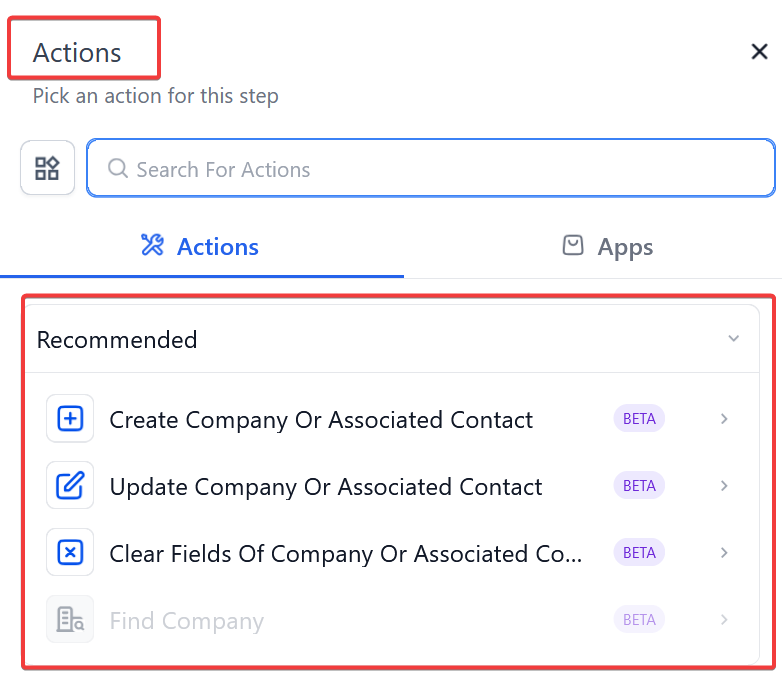
- Use actions like:
-
- Create Company or Associated Record
- Update Company or Associated Contact
- Clear Fields (for either Companies or their Contacts)
- You can also include delays, conditions, and branches as needed.
Step 4: Use Cross-Object Actions (Optional)
- In Contact-based workflows, you can:
-
- Create Associated Company
- Update Associated Company
- Clear Fields of Associated Company
- Combine with If/Else logic to act only under certain conditions.
Step 5: Save, Test & Publish
- Save your workflow.
- Run test enrollments or wait for real-time triggers to activate automation.
FAQs
Question: Can I use Company-Based Workflows without affecting individual contact workflows?
Answer: Yes, Company-based workflows operate independently and can run parallel to contact workflows. This allows you to automate company-level processes while still managing contact-level automation separately.
Question: Can I trigger a workflow based on Company field updates?
Answer: Yes. Use the Company Changed trigger and specify which fields (e.g., Status, Industry) should initiate the workflow.
Question: Can workflows interact with both Company and Contact data?
Answer: Absolutely. You can update, create, or clear fields for associated records either within a company-based workflow or a contact-based workflow.
Question: What’s the difference between “Create Associated Company” and “Update Associated Company”
Answer:
- Create Associated Company: Adds a new company and links it to the contact.
- Update Associated Company: Edits details of an existing company linked to the contact.
Question: Is it possible to send emails to all contacts linked to a company?
Answer: This functionality is coming soon, with a new action called Send Email to Associated Contacts, allowing you to broadcast updates across all linked contacts.
Question: Is there a limit to how many Contacts can be linked to one Company?
Answer: No. You can link as many contacts as you need to a single company record. The workflow will apply its logic to the company level regardless of whether there are two employees or two thousand.
Question: Can I update a Company record even if the workflow was started by a Contact?
Answer: Yes. Using Cross-Object Automation, you can configure a Contact-based workflow to interact with an associated Company record, such as updating the company’s status when an individual contact’s status changes.
Question: What are the two specific triggers available to start a Company-Based workflow?
Answer: You can initiate these workflows using either the Company Created trigger (which activates when a new record is added) or the Company Changed trigger (which activates when a specific field, such as Industry or Status, is updated).