
Troubleshooting Facebook Ad Reporting Setup
Facebook Ads are a powerful tool for promoting your business, but to ensure you get the best results, you must have the correct setup. If the settings are not configured properly, you could be losing valuable data, time, and money. This guide will help you troubleshoot and optimize your Facebook ad reporting setup to make sure you're getting the most accurate data and insights.
Q: Why isn’t my Facebook Ad Account Integration showing as active?
A: If your Facebook Ad account is not properly integrated, it can result in missing or inaccurate reporting. The integration must be active, and the account should have the correct permissions.
Steps to Fix:
1. Go to Settings of your Mastermind account and check under Integrations to verify the Facebook Ad account connection.
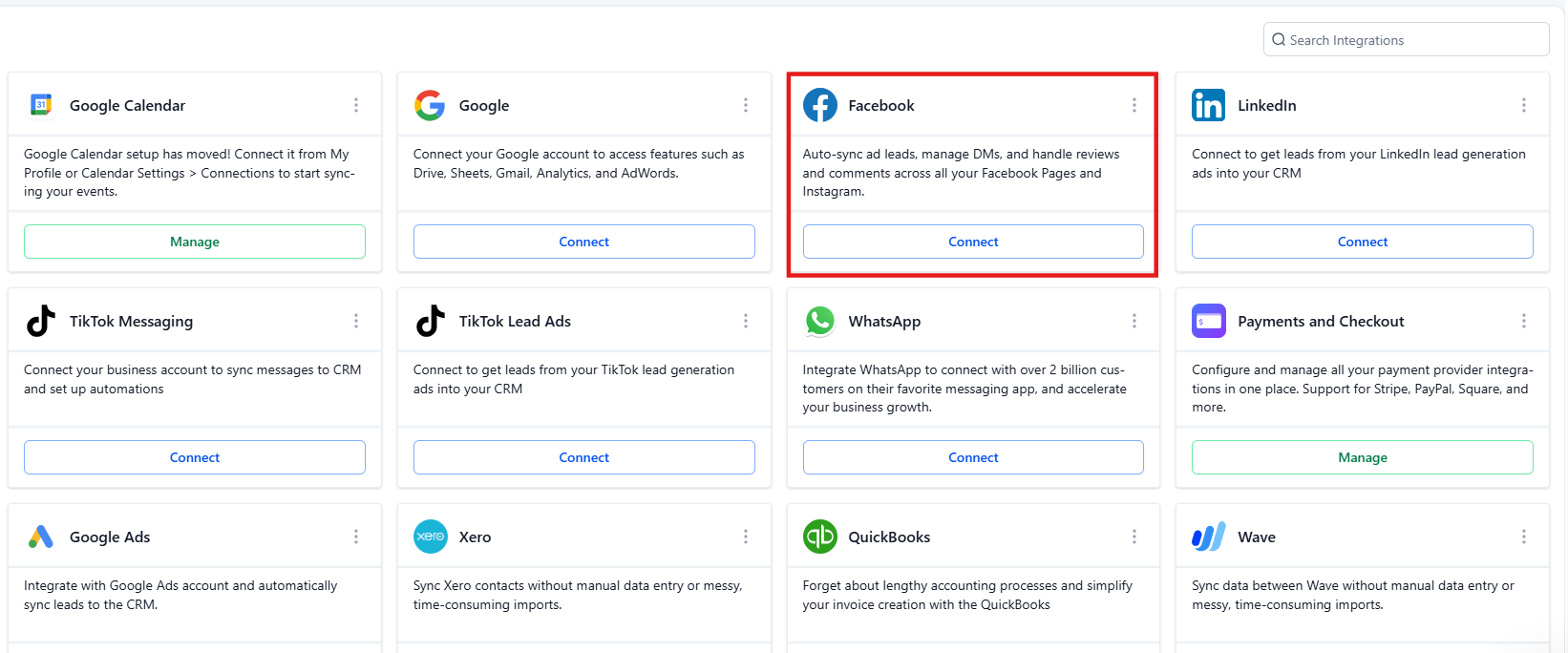
2.Ensure that you have admin permissions for the Facebook Ad account. For that, you will need to navigate to Settings > My Staff > Edit > Roles and Permissions)
.jpg)
3. If you don't see your page under integrations, ensure Mastermind access is granted correctly (check How to Assign Mastermind Access).
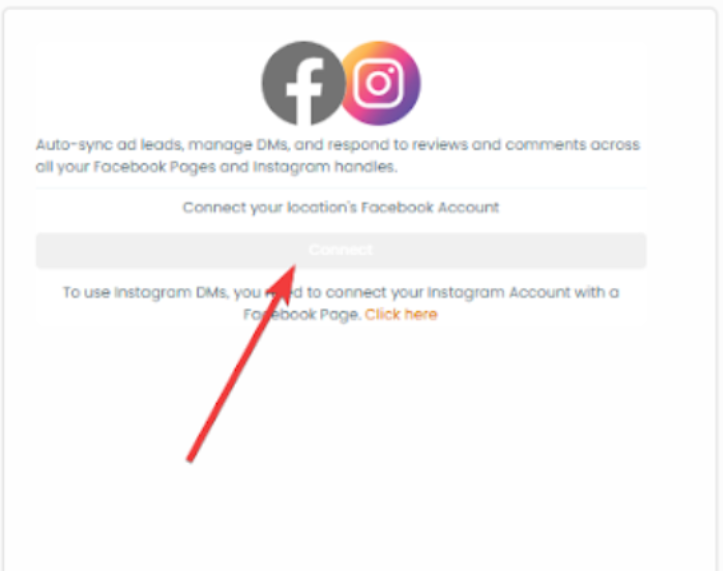
4.If you are the admin of the Facebook page, verify that Lead Connector is accessible and properly connected to your page.
Q: Why is my UTM tracking not showing the correct data?
A: The UTM tracking template should be added at the tracking section, not at the destination, to ensure that all tracking data is captured properly.
Steps to Fix:
1-Navigate to your Tracking settings.
2-Ensure that your UTM tracking template is added in the correct section, and not under the destination.
3-After adjusting, test to confirm that the correct UTM parameters are being captured in the reports.
Q: Why are there duplicate entries for the same contact in my ad sets or ads?
A: Duplicate entries can occur if the campaign, ad set, and ad names are not unique. It's crucial to differentiate between each ad to avoid overlaps in data.
Steps to Fix:
1-Make sure that each campaign, ad set, and ad has a unique name.
2-Avoid reusing similar names or parameters across different ads.
3-For example, use distinct names for campaigns and ad sets like:
- Campaign Name: New Restaurant Launch
- Ad Set Name: Dish 1 Starter
- Ad Name: 1.1 Fresh Red Pasta
This ensures each entry in your reporting is distinct, avoiding confusion or duplicate leads.
Q: Why isn’t my Facebook ad data updating after changing ad names?
A: Changing the name of your Facebook ad campaigns, ad sets, or ads does not automatically update the UTM parameters, which can lead to discrepancies in the reporting data.
Steps to Fix:
1-Do not change the name of campaigns or ad sets after they are launched. Instead, create new campaigns or ad sets if you need to make changes.
2-If you change the name without creating a new campaign, the data will continue to reference the old campaign names due to the associated UTM parameters.
3-To ensure accurate tracking, create new campaigns, ad sets, and ads rather than simply renaming them.
Q: Why am I not receiving leads from my Facebook Lead Form?
A: If the lead form is not connected properly to the correct Facebook Page, it will not capture the leads. Ensuring that the Facebook Page is correctly mapped is essential.
Steps to Fix:
1-Navigate to your Lead Form settings and ensure that the correct Facebook Page is selected. (settings>integrations>facebook form fields mapping)
.png)
2-Confirm that the page is active and correctly mapped to your Mastermind.
3-Make sure text fields and custom fields are mapped correctly, but radio custom fields cannot be mapped with Facebook lead forms.
4-Also, be aware that timezone fields cannot be mapped to Facebook lead forms.
FAQ's
Question: What should I do if my Facebook Ad Account integration isn’t showing up?
Answer:
- Ensure your account has admin permissions.
- Check if the Facebook page is accessible and properly integrated into the system.
- Review your Mastermind access and permissions to verify that everything is set up correctly.
Question: How do I fix duplicate contacts in my Facebook Ads reporting?
Answer:
- Use unique names for each campaign, ad set, and ad.
- Avoid reusing names across different ad sets or ads.
- If needed, adjust your naming conventions to make each campaign and ad set identifiable and distinct.
Question: How can I ensure my Facebook Lead Form is properly connected?
Answer:
- Double-check that the correct Facebook Page is selected during the lead form mapping process.
- Make sure all required fields are mapped correctly (text fields and custom fields).
- Avoid using radio custom fields and timezone fields as they cannot be mapped.
Question: Why are my Facebook Ads not tracking conversions correctly?
Answer: This often happens when the pixel is not installed correctly or events are not prioritized properly. Make sure your pixel is active, installed on the correct pages, and that your conversion events are set up and verified in Events Manager.
Question: Can I map all types of custom fields from my Facebook Lead Form to my Mastermind account?
Answer: No, there are specific limitations. While text and standard custom fields can be mapped, radio custom fields and timezone fields cannot be mapped from Facebook lead forms to the system.