
Reporting: Audit Reports
The Marketing Audit is a comprehensive diagnostic tool designed to provide an in-depth analysis of your business's (or sub-account's) overall performance. By evaluating key marketing and operational areas, this audit helps you uncover growth opportunities, identify strengths and weaknesses, and position your agency as a powerful partner to your clients.
Key Features and Benefits
Measure Business Health at a Glance
- Get an at-a-glance snapshot of your business’s performance across several essential marketing and operational metrics, helping you quickly identify areas for improvement.
Reinforce Company Value
- Provide clients with clear insights into their business health and show how your Business is driving growth and improvements in their marketing efforts.
Boost Visibility into Key Metrics
- Access detailed insights to guide decision-making, optimize business performance, and enhance client satisfaction.
What Does the Audit Include?
The Marketing Audit provides a thorough analysis of various aspects of your business's online presence. Here’s what it covers:
Measure Business Health at a Glance
- Get an at-a-glance snapshot of your business’s performance across several essential marketing and operational metrics, helping you quickly identify areas for improvement.
Reinforce Company Value
- Provide clients with clear insights into their business health and show how your Business is driving growth and improvements in their marketing efforts.
Boost Visibility into Key Metrics
- Access detailed insights to guide decision-making, optimize business performance, and enhance client satisfaction.
Global Reach with Multilingual
- Break down language barriers by sharing or exporting reports in 13 different languages, allowing you to build trust and credibility.

How to Generate the Marketing Audit Report
Generating the Marketing Audit report is simple and can be done in just a few steps:
1. Go to: Tools & Reporting > Reporting > Audit Report
2. Click: ‘Generate Report Now’ – Wait a few moments as the report is auto-generated.

Once generated, sub-account admins will receive an email notification confirming the report’s availability.
Note: If the report isn't being generated, make sure your location’s profile details include the correct Google Place ID URL under social links. If no Place ID is found, the system will try retrieving it from GBP integrations, but if it's still unavailable, the report won't be generated.
Competitive Analysis in the Marketing Audit
The Marketing Audit also features an AI-powered competitor Analysis to help you understand how your business compares to others in your market. This valuable insight allows you to fine-tune your strategy and remain competitive.
How to Add Competitors and Generate the Report
1. Navigate to the “Compare Reports” tab after your Marketing Audit has been generated.
2. Add up to 3 competitor businesses by entering their details.
3. Click “Compare Reports” to initiate the AI-driven competitor analysis and generate insights for side-by-side comparisons.

Generate and Share the Marketing Audit Report
Generating the Marketing Audit report is simple and can be done in just a few steps:
- Go to: Reporting > Local Marketing Audit 2. Click: ‘Generate Report Now’ – Wait a few moments as the report is auto-generated.

Sharing and Exporting in Multiple Languages
You can customize the language of the report to match your prospect's needs:
- Web Sharing: Choose your preferred language when generating a shareable web URL.
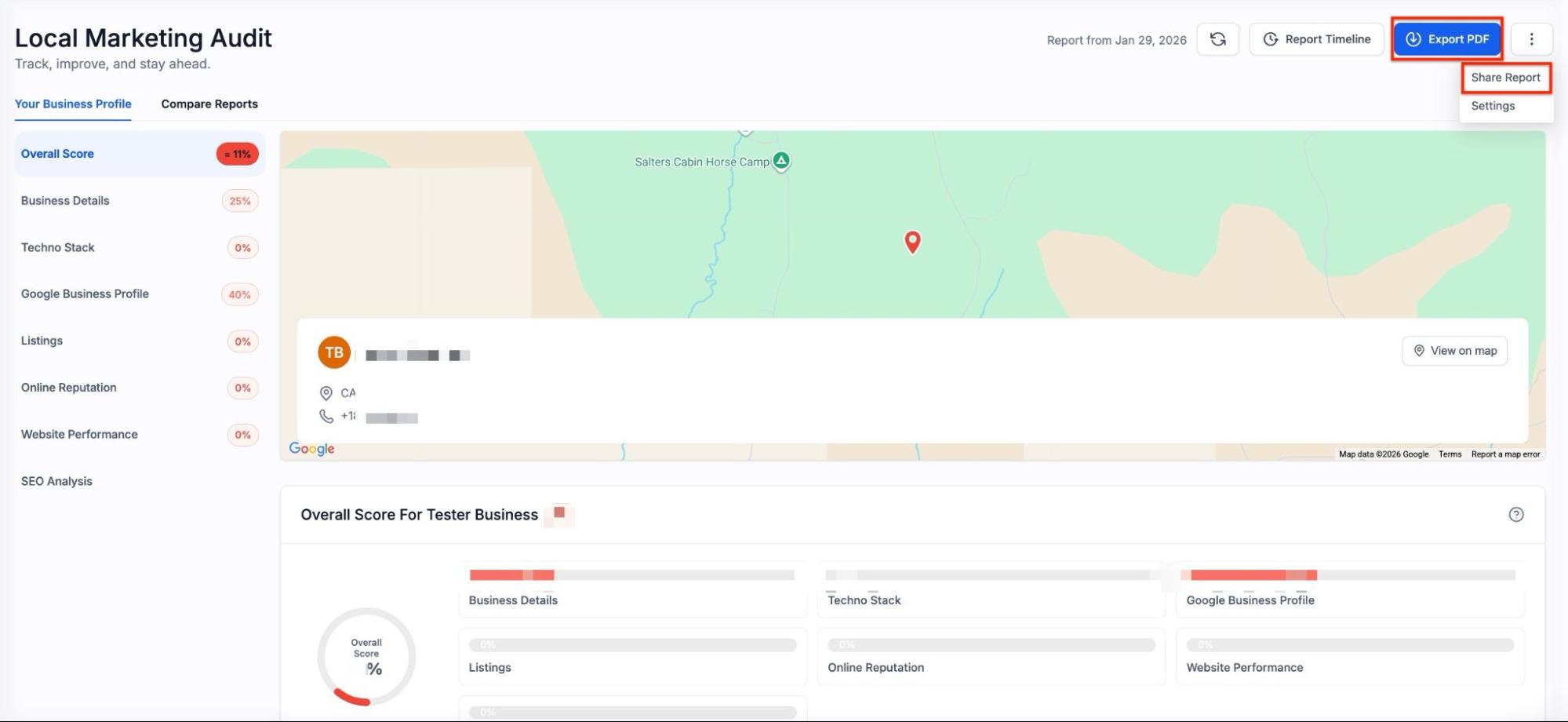
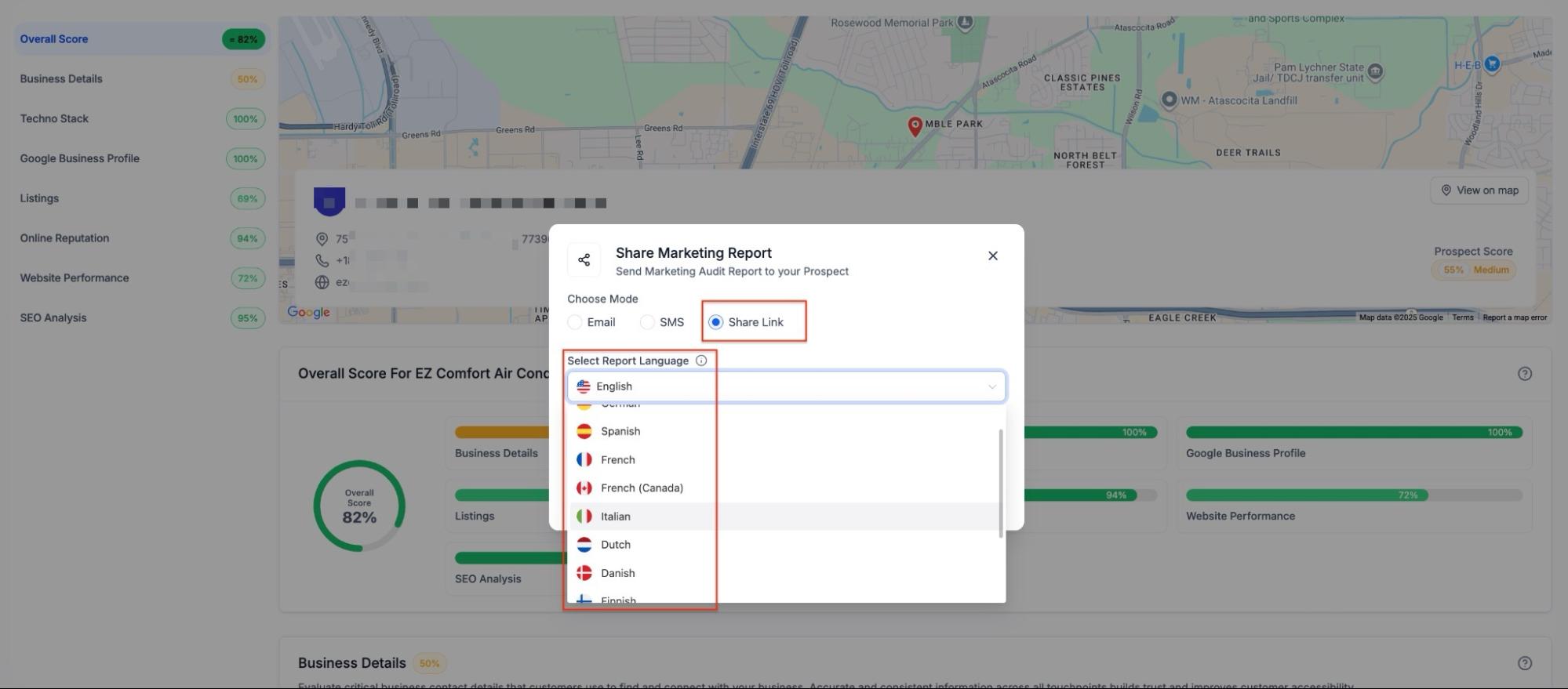
- PDF Exports: When clicking "Export," select from the 13 supported languages (including Spanish, French, German, Italian, Dutch, and more) to generate a localized PDF.
- Interactive Language Switching: If you send a report and aren't sure of the prospect's preference, they can manually switch the language themselves while viewing the live report.
What Does the Competitor Analysis Include?
The competitor analysis focuses on two essential areas:
- Listings Comparison
- Compare your business’s listings accuracy, completeness, and optimization against your competitors to see where you stand.
- Online Reputation (Reviews) Comparison
- Compare the volume, sentiment, and engagement strategies of reviews between your business and competitors, helping you identify strengths and areas where you can improve your online reputation.
Note: The competitor analysis is based on publicly available listings and reviews, so make sure your business’s data is up to date and accurate.

Pro Tip
To stay ahead of your competitors and track your progress, run the Marketing Audit at least once a month. Regular audits will help you monitor your performance, identify new opportunities, and keep your business on the path to success.
FAQ
Question: How often should I run the Marketing Audit?
Answer: It's recommended to run the Marketing Audit monthly to keep track of progress and uncover new opportunities for growth.
Question: Can I compare my business against multiple competitors?
Answer: Yes, you can add up to three competitors to compare against your business. For fresh insights, you can update your competitors anytime by entering new details.
Question: Do I need a Google Business Profile to use the Marketing Audit?
Answer: Yes, having a Google Business Profile is essential for generating the report, as some elements, like the Google Business Profile Audit and Local SEO Heatmap, rely on the GBP data.
Question: Is the Competitive Analysis available for all businesses?
Answer: The Competitive Analysis feature is available for businesses that have generated a Marketing Audit report. You can add competitors and generate the comparison report after your initial audit is completed.
Question: Can I export the Marketing Audit report?
Answer: Yes, the Marketing Audit report can be downloaded and exported for further review or client presentation.
Question: How can I make the most of the Marketing Audit?
Answer: Run the audit regularly (monthly), update competitor data, and use the insights to optimize listings, improve reputation management, and refine marketing strategies.
Question: What should I do if my Marketing Audit report isn't generating?
Answer: If the report isn't being generated, ensure your location’s profile details include the correct Google Place ID URL under social links. If no Place ID is found, the system will attempt to retrieve it from GBP integrations, but if it’s still unavailable, the report won’t be generated.
Question: How can I maximize the audit’s value?
Answer: Run it regularly, keep your business and competitor data updated, and use insights to refine listings, reputation management, and marketing strategies.
Question: How do I know when my Marketing Audit report is ready to view?
Answer: Once you click "Generate Report Now," the system will auto-generate the data. Mastermind admins will automatically receive an email notification as soon as the report is available.