
How MBA Members Can Book a Call with Our Hub Experts
Our Hub Experts are here to help our MBA members with technical questions, setup guidance, and platform optimization. Follow these steps to schedule your one-on-one support session.
1. Log in to Mastermind.com
- Go to Mastermind.com.
-
Log in with the email address linked to your Mastermind account/MBA registration.
2. Navigate to the Business Academy Tab
*Important Note: You will only be able to access the Business Academy tab if you are an active Mastermind Business Academy member.*
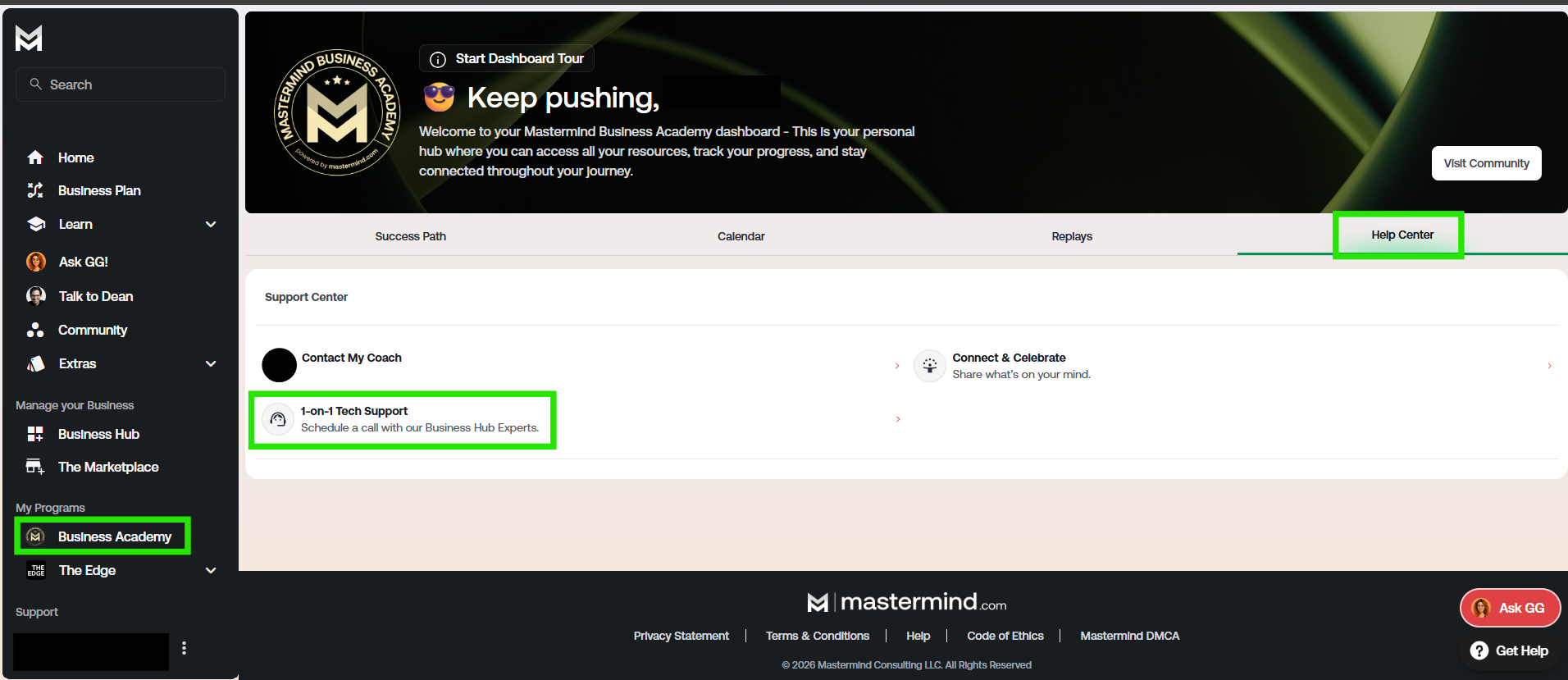
- In the main menu, click the Business Academy tab.
- Inside the Business Academy tab, click the Help Center tab.
-
Select 1-on-1 Tech Support – Schedule a Call with Our Business Hub Experts.
3. Fill Out the Scheduling Form
- You’ll be taken to a form where you’ll enter your contact information.
-
Important: Use the same email address linked to your Mastermind account so we can match your submission and assign the right expert.

4. Review & Agree to the Terms
- Complete all required fields in the form.
- Check the box to agree to:
- Terms & Conditions & Privacy Policy
5. Continue & Confirm
-
Click Continue to submit your request.
You can access this form via the Hub Experts tab in your Business Hub Navigation Menu as well:

If you need any assistance or have any questions, please email our Customer Support team - we're more than happy to help!